ROLE
About JM Pro and blinkX
JM Financial Services is a full-service brokerage offering trading and investment products across equities, derivatives, mutual funds, bonds and IPOs.
JM Pro and BlinkX were its two trading platforms, built for different customer segments.
The platforms have since merged into a single digital broking business as JM Pro.
Overview
When traders come to the platform to log in, they want to get in quickly and start trading. But the current four-step flow takes around two minutes, making this simple goal frustrating.
Password and MPIN reset issues account for 40% of all support tickets, showing that this is a recurring problem and for the business, this increases support costs and puts trading volume, brokerage revenue and customer trust at risk.
Current Flow

Observations
How to reset my password and MPIN?
When the participant forgot their password / MPIN, the flow offered no visible reset option or guidance. This broke a familiar login convention and left them without a clear way to recover and continue.
Heuristic violated: Help and Documentation · Consistency and Standards · Error Recovery
Impact: This delays access to trading and creates unnecessary friction for frequent users.
Primary CTA does not follow the Brand guidelines.
The login CTA does not match the approved BlinkX primary-button component in shape, corner radius and icon treatment.
Heuristic violated: Consistency and Standards
Impact: This weakens BlinkX’s visual identity, makes the experience feel less cohesive and can reduce brand recognition and trust. Internally, it also creates one-off UI debt that is harder to scale.

From a regulatory standpoint
NSE requires two-factor authentication, but it does not require both a password and an MPIN. Either one can serve as the knowledge factor, paired with OTP as the possession factor.
NSE Circular: Implementation of Two-Factor Authentication

competitive study
I benchmarked leading brokers to understand how they reduce login friction while meeting 2FA requirements.

Insights:
Passwords are no longer the dominant login pattern. Most competitors use OTP with PIN/MPIN.
QR login is becoming the fastest path for web users, avoiding manual credential entry.
Mobile number is the most common entry point, while Client ID and PAN are offered as alternatives.
Beyond Trading: How Modern Products Simplify Login
I also studied login experiences beyond trading platforms to understand how consumer and enterprise products balance speed, security and recovery.

Insights:
Products offer multiple login routes instead of forcing every user through one fixed flow.
Passwordless options: OTP, magic links, passkeys and biometrics—reduce dependency on passwords.
QR login lets users scan with a trusted phone and authenticate using a biometric or device PIN.
The key takeaway for BlinkX: strong security does not need to come at the cost of speed or convenience.
SOLUTION
Updated flow

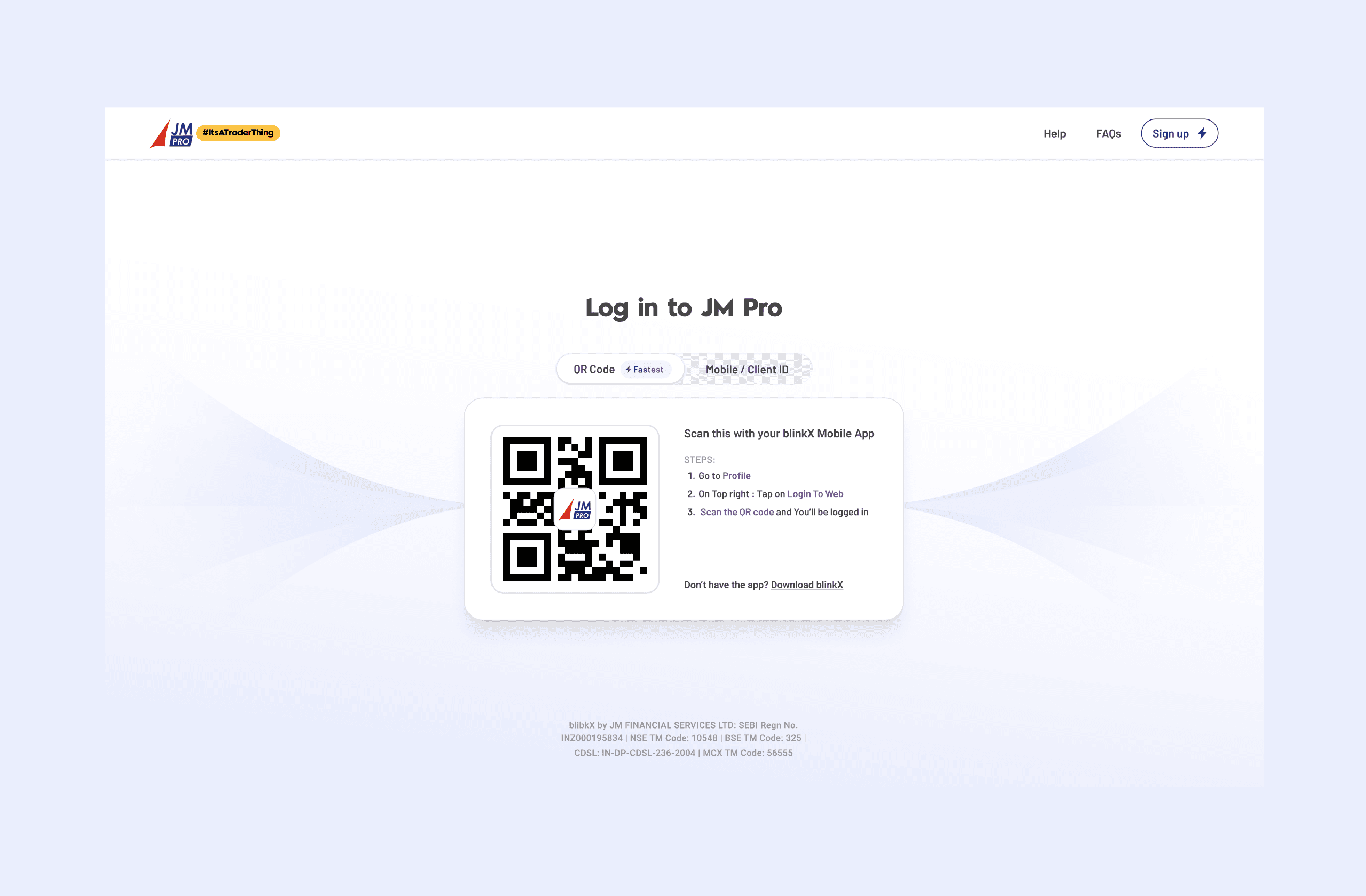
Redesigned login page

Design Decision:
Help and FAQs
Provides immediate assistance when users are stuck, reducing abandonment and dependence on customer support.
Clear sign-up path
Separates new-user onboarding from login, helping existing traders stay focused on accessing their accounts.
Choice of login method
QR login is prioritised as the fastest route, while Mobile/Client ID remains available as a familiar fallback. Clearly labelled tabs help users switch quickly between related options
QR-based login
Removes the need to manually enter and remember multiple credentials. Users scan the QR code and approve the login through blinkX mobile app, reducing effort and time to trade
Step-by-step guidance
Explains where to find the scanner inside the app, reducing hesitation, failed attempts and support requests.
App download fallback
Provides a clear path for users who do not have the BlinkX app. Clicking “Download BlinkX” opens a QR code, allowing them to install the app and continue with QR login instead of reaching a dead end.
Log in with QR Code from mobile App
Log in with Mobile / Client ID

Design Decision:
Recognise saved login details
When users select the field, previously used Mobile Numbers and Client IDs appear as masked options. This supports Heuristic: Recognition Rather than Recall, allowing users to select an account instead of remembering and re-entering the details.
Reset MPIN